Special Products
Special Products are similar to Featured Products and are another way to highlight a specific product (or Products) in your store.
The main difference between the two is Special Products are designed to have a discount applied to them, where as Featured products are just “highlighted” products on your store.
They ways Special product are highlighted will depend on your store layout.
As a minimum the “Special price” will be shown on the product listing and product information pages on the public side of the site (image right)
They can also be shown on the homepage, on category pages or on product listing pages.
It depends on how your store is designed and configured.
To access the “Special” products menu go to Catalog–>Specials.
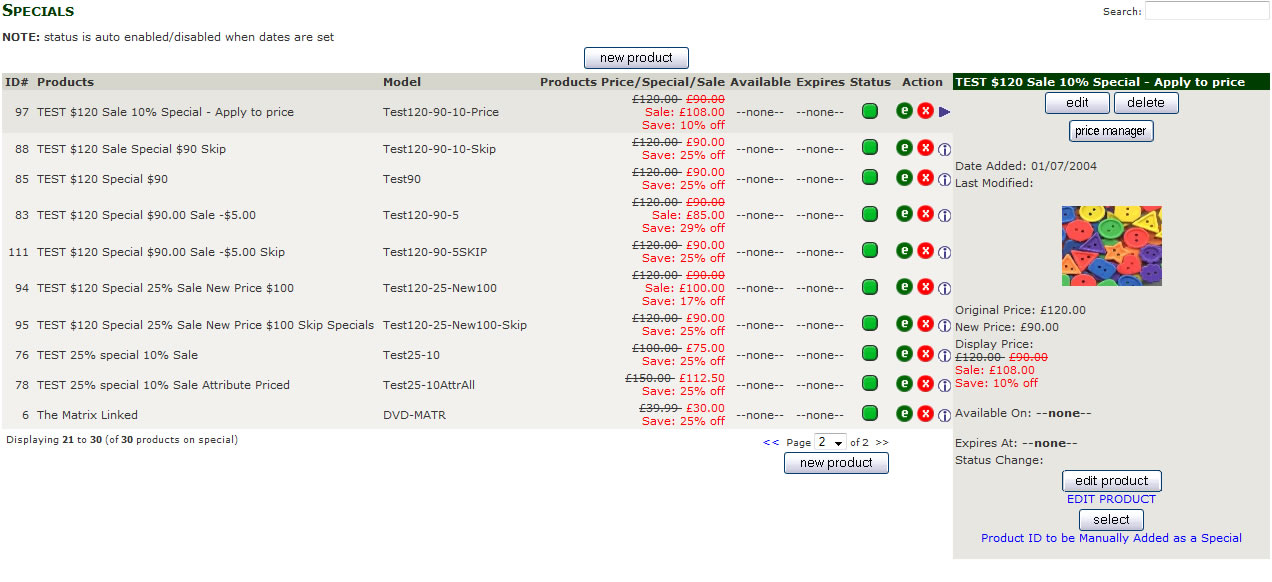
On this page you will see a list of current Specials configured on the site. To add a new Special product click the new product at the top or bottom of the listing.
As the instructions for adding and editing Special are the same as adding Featured products please follow the instruction on the page Adding a Special or Featured Products.
To edit an existing Special either click the  or click the
  , selecting the will display a panel with some useful functions for special products.
As the instructions for adding and editing Special are the same as adding Featured products please follow the instruction on the page Adding a Special or Featured Products.
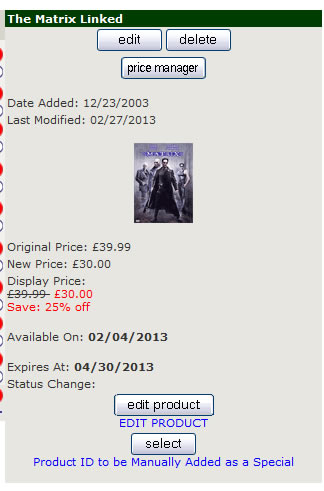
From this panel you can
edit the “Special” information
delete the product (this removes the Special status from the product, its does NOT delete the product).
Price Manager take you to a page where you can edit pricing information for the product.
edit Product take you to the edit a product page, where you can make changes to the product.
select let you enter a product id to create a new special product
The panel also displays some information about the products Special status, including Price details, start and expiry date of the Special status.
Special Products and Featured Products are added and editied in a very similar way.
For instruction on adding please visit Adding a Special or Featured Products.
For instruction on editing please visit Editing a Special or Featured Products