Edit Orders
The Order Detail Page gives all the information you need about the order your customer has placed.
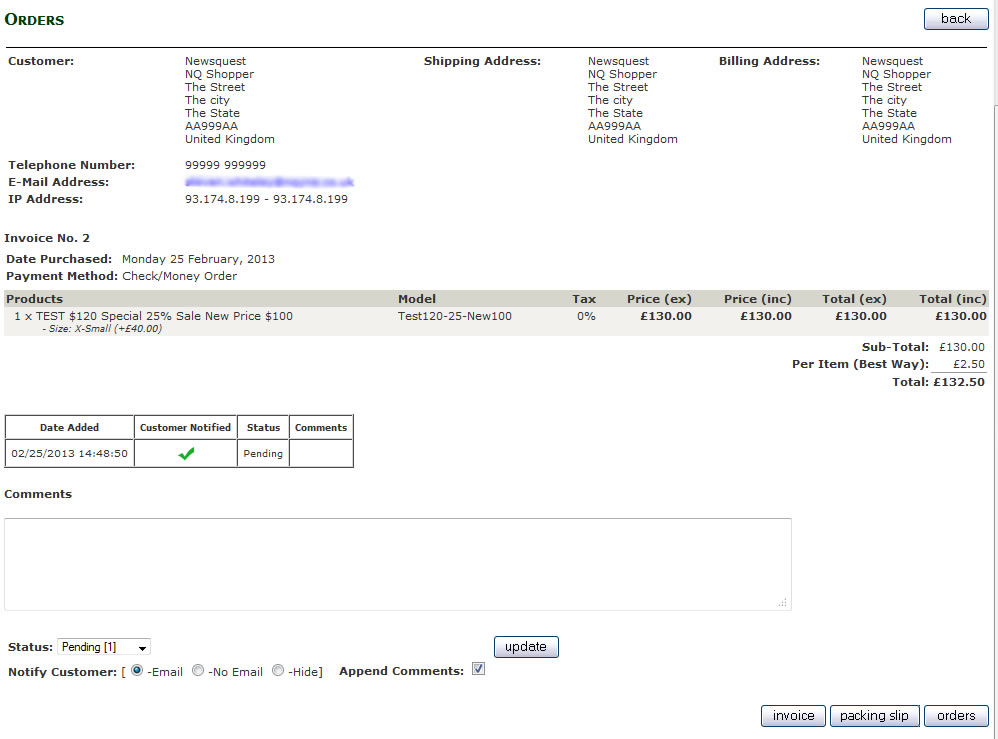
As with the Order list page you can create printable invoices and packing slips for the order with the buttons at the bottom of the page.
You can also use this page to provide your customer with information about their order, or add notes to the order using the Comments section.
You can update your customer with comments or use the dropdown menu to provide an update the status of their order.
Or you can use a combination of both Comments and Status updates.
To do this, add any comment to the customer in the text field.
And/Or
Select a different Status
Then there are four further options to select from when adding comments to an order.
Notify Customer:
Email: this sends the customer a copy of the comments and adds it to the order comments section of their account.
No Email: adds comment to the order comments section of their account.
Hide: only shows the comment in the admin screen, NOT visible by the customer.
Append Comments, this save the message on the site admin and is visible to the customer in their order details page.
This is the extent of Zen Cart default order editing features, it does not have the ability to amend orders once they are placed, you can’t add or remove products.